Linkify in your browser
Extract and audit every link on the page you are viewing, highlight the problem ones, and build UTM links in one click. Free, private and local.
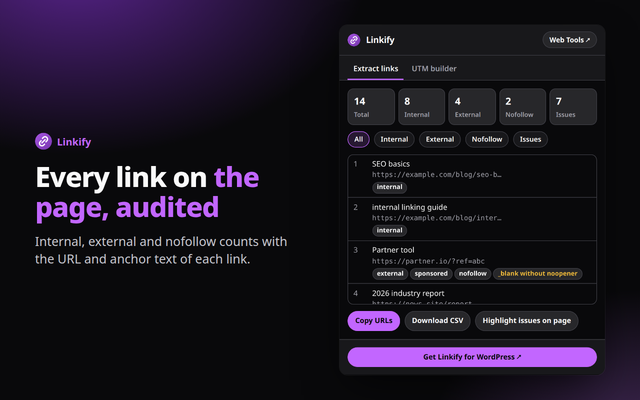
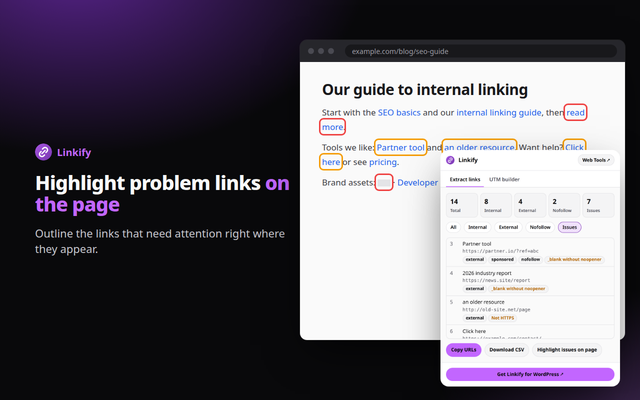
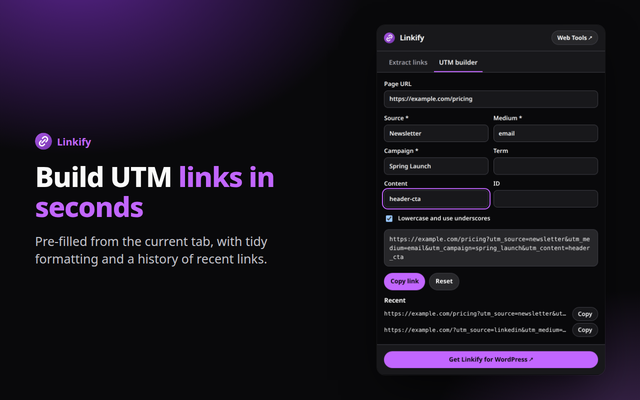
Quick answer: Linkify is a free browser extension for Chrome, Edge and Opera (Chromium browsers). It lists every link on the current page with counts and issue flags, highlights problem links on the page, exports to CSV, and builds UTM-tagged URLs. Everything runs in your browser.
What it does
- Audit every link: internal, external and nofollow counts with the anchor text and URL of each link; filter, copy the URLs or download a CSV.
- Spot problems: flags empty and generic anchors, links with no real destination, non-HTTPS links and _blank without noopener, and outlines them on the page.
- UTM builder: pre-filled from the current tab, with tidy formatting and a history of your recent links.
How to install
- Download the zip above and unzip it to a folder you will keep.
- Open
chrome://extensions(oredge://extensions,opera://extensions) and switch on Developer mode. - Click Load unpacked and choose the unzipped folder, then pin the extension from the puzzle-piece menu.
Firefox only keeps unsigned add-ons until it restarts (about:debugging, Load Temporary Add-on), so a Firefox build will come from the add-ons store once published.
Private by design
The extension runs entirely in your browser. It reads a page only when you open it, sends nothing anywhere, and needs no account. See the Developry privacy policy.
Prefer the web version?
The same kind of tools work in any browser tab: try the free text linkifier on this site, or get the Linkify Internal Links plugin for WordPress.
Frequently asked questions
Is the extension free?
Yes. It is free, with no account and no ads.
Is my browsing data collected?
No. Linkify reads the links of the current tab only when you open it and sends nothing anywhere. Your recent UTM links are stored on your device only.
Which permissions does it need?
activeTab and scripting to read the current page when you open the popup, and storage to keep your recent UTM links.
Which browsers are supported?
Chrome, Edge, Opera and other Chromium browsers, installed from the downloaded zip. Firefox will follow through the add-ons store.
Is there a WordPress plugin?
Yes. Linkify Internal Links by Developry helps you manage internal links in WordPress. The plugin page is on developry.com.